Category Archives: beginning scrapbooking

Finding the Time

Finding the Time

One of the biggest complaints/excuses out there about why people choose not to scrapbook is that they just don’t have the time.

There’s this perception that scrapbooking and memory keeping in general takes this huge amount of time out of your day. I’ve never found that to be the case, but that may be due to the way I approach the whole concept.

Making a scrapbook page doesn’t mean you have to have all your photos printed and organized first, nor do you have to make your page extremely artistic or even tightly designed.

Nor do you have to do ten pages about one event, or even tell the story in chronological order.

Scrapbooking is so much simpler than that.

It is one story, and a piece of paper to write it on, plus a picture or two or three to illustrate your story. That’s it. Everything else is bells and whistles.

You don’t even need paper. A status update on Facebook, like this one I put up yesterday is totally scrapbooking. It’s just a digital version.
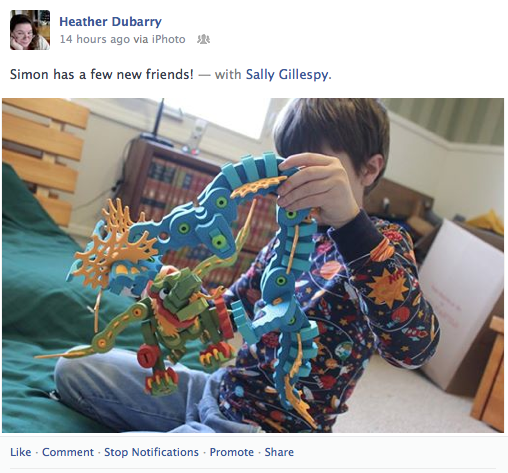
FB status grab

Now, I’m not recommending that you never put anything on paper. In fact, at the rate in which technology changes and gets damaged, having only digital records would be a recipe for lots of lost memories.

However, that doesn’t mean it’s not useful. Especially if you use it as a temporary warehouse for memories, for when you have five minutes to document your story in a more lasting manner.

So that’s one way for you to capture memories quickly and easily. You’re even probably already doing that.

How about a couple other quick ways to document your life before we finish for today?

Next up? An old school organizing tool–your calendar or agenda. Yep. That pile of paper hanging on your wall or tucked into your purse. That is a great, quick scrapbooking tool.

Simply write down memorable things someone said or did in the relevant square, and you’ve done some scrapbooking. Really! It doesn’t get much easier than that.

Last up– journaling cards that are designed for pocket pages. This is the latest trend that has been sweeping the scrapbooking world– it’s been going on for a few years now, and shows every sign of expanding and really and truly altering the way people save their memories.

It’s a simple concept–write a few notes about a day or an event, and pair it with a few photos, and you’re done. You can add artistic elements if you so desire, but the important thing is saving those memories.Using pocket pages to document life || noexcusescrapbooking.com

The cards are about the same size as a playing card, so are really easy to slip into a pocket or purse to have handy when you just have to capture the latest goofy thing you heard. (Around here, we concentrate on goofy and silly, in case you were wondering.)

That’s all you really need to start scrapbooking. Really.

A memory, and a place to store it. It doesn’t matter if it’s digital, or paper, it’s still a memory worth saving, and it doesn’t take very much time at all. You can definitely squeeze it into your busy schedule.

You were going to post that adorable cat/kid/spouse photo anyway, weren’t you?

Branching Out Into New Territory

Branching Out Into New Territory

This week was all about branching out into new territory. Not only did I change a little thing that has defined me all my life, but I also opened up a shop on Redbubble.

What’s Redbubble? It’s an independent artist community and shop, where you can upload images for printing on anything from posters to shirts to iPhone cases. You can then make those images available for purchase, where you set the markup, which controls how much you make off a particular item.

I have a lot of flower photos. You could even call me a flower stalker (pun intended.) It seemed silly to have all these flower photos sitting on my hard drive, taking up space, and not use them for something interesting. So I started making some art pieces at Lain’s using image transfers, and I’ve put a few of my favorite images up on Redbubble.

Check out my portfolio at Redbubble, and see what you think. I’m just getting started, so if you have any thoughts or opinions, please share. I’d love the advice!

sedum at alcatraz || noexcusescrapbooking.com

Sedum at Alcatraz || One of my first up close and personal flower stalker pictures, taken with my 5mp point and shoot

Oh, and one more thing– in case you didn’t know, I’ve also joined the Origami Owl bandwagon– I love their jewelry! I have a jewelry bar next week if anyone is interested in joining me here, or ordering online. You can place an online order here, or if you’d like to come visit me, the details for the party are here.

origami owl || flowers for spring

Since it’s spring, and there should be flowers, I’m wearing this!

Have I mentioned lately how much you are all appreciated? Thank you so much for joining me on this crafty journey! It wouldn’t be the same without you.

A Quick Challenge for You

A Quick Challenge for You

Today, I changed something fundamental about myself, something I didn’t think would ever change. I have been tongue-tied, literally, all my life, and it has always been one of the weird little things that define and describe me.

Today that changed. I am no longer tongue-tied. At least in the literal sense. (All bets are off for tripping over words. Guaranteed that will still happen!)

So, what’s one little weird thing that defines you? Have you documented it yet? Maybe you should! You definitely don’t have to, but think about how much fun it would be to go back and see something about a part of you that you thought would never change, and suddenly has!

Case in point: My T page from the Me: the abridged version album I did for a Cathy Zielske class over at BPC.

T || noexcusescrapbooking || design by Cathy Zielske

The journaling reads, in part:

Tongue-tied

This is me, literally and figuratively.There’s a membrane that attaches the tip of my tongue to the bottom of my mouth. Reason I look so weird when I stick my tongue out. Genetic. Passed on to Simon, but it’s not as extreme on him. I am also very good at loosing my train of thought mid-speech, which comes across as stuttering, muttering, and general trailing off of sentences. Luckily for me, I have a husband who helps keep me on track.

So glad to have that now that it is no longer true. It may be time to do a new album. Or not. It’s only been 4 years. We’ll see!

Now, don’t you think it’s time to document yourself before you become a new and improved you?

PSA: If you are tongue-tied, and you’re having trouble with your gums, run, don’t walk to your dentist! A little bit of pain now can really help preserve your teeth in the long run.

Getting Crafty at the Crop at Lain’s

Getting Crafty at the Crop at Lain’s

Last weekend, I spent Saturday at a crop at Lain Ehmann’s. I’ve known Lain for years, and take advantage of any opportunity to visit, since it’s always a fun time.

I’ve been to enough local crops recently, that all my easy, journaling-light projects are all up to date. So what to work on? Granted, there was sure to be lots of chatting going on, but what’s the point of going to a scrapbooking crop if you don’t make SOMETHING, right?

So then the wheels started turning, and I decided that maybe it was time to play with a technique I’ve done before, but this time use a few different materials: image transfers. I’ve done image transfers before, but with self-stick acetate, not multi-medium.

After re-watching Stephanie Hamen’s True Scrap 5 class (affiliate link), I gathered my photos and materials, and packed everything up for the crop.

Flower pics || noexcusescrapbooking.com

One of the things I wanted to do was start with a messy background before adding the image transfer over top. The idea I’m going for is a bit messy and multi layered.

This is what I got done on Saturday:

watercolor paper image transfers || noexcusescrapbooking.com

These were done on water color paper that had been misted and painted. The ones below are on some canvases I had painted years ago, and when I didn’t like how they were turning out, shelved for a while.

pre-painted canvas image transfer || noexcusescrapbooking.com

You can see that some images transferred better than others, and that others are still not completely paper free. But these are off to a promising start. They definitely need a bit more layering and such. Hopefully they’ll turn out interesting enough to share with you!

Do you have any photos that you’d love to turn into art pieces? What are you going to do with them?

Do YOU want to be a Design Star?

Do YOU want to be a Design Star?

How many of you out there have ever dabbled in digi-scrapbooking? How many of you have wanted to design your own patterned papers or embellishments? How about pocket page cards and cut files? Have you ever wanted to design those?

Do you have a basic grasp on how to use Photoshop? (Most important concept-do you understand layers?)

You do? Excellent, because there’s a class coming up that you will absolutely LOVE.

The Design Star with Traci Reed class (affiliate link) over at Scrapaneers is now open for registration, and begins Aprll 7th. She first ran the class last fall, and I was lucky enough to take the class.

Before I took the class, I had only used Photoshop Elements, and I was able to complete some of the assignments in Elements. However, there are certain things you can do in Photoshop that you can NOT do in Elements, so for the end of class, I took advantage of Adobe’s free trial and used Adobe Creative Cloud.

By the end of the class, I was able to make this:

preview first digi kit

(If you want to download it and take a closer look at it you can find the info here: Doing a Digi Dance)

The Design Star class (affiliate link) is jam packed with information, and Traci walks you through the entire design process, from creating a mood board and color palette, to creating your own patterns and word art and embellishments. Not only is there great introductory information pre-recorded for each week’s topic, but there are also office hours, where Traci demonstrates  tricks, shortcuts, and techniques that will really help you learn the ins and outs of digital designing. There’s even a peer review and a one-on-one video chat with Traci at the end of class to go over your strengths and weaknesses!

I can not recommend this class highly enough. No matter what your skill level is, you will learn a lot that you can use to create gorgeous digital products, be it for your own personal use, or as a professional designer.

If you have any questions about the class, drop them in the comments, and I’ll forward them on to Traci and get some answers for you. Maybe we’ll even have a Q&A post later this month for  you!

This is one class that is worth every penny, and then some. If you harbor even vague dreams of becoming a digi designer, this class will get you on your way!